CPU hotplug
关键参考
[Linux 内核 | CPU 热插拔(Hotplug)](https://www.dingmos.com/index.php/archives/117/)
文档和参考资料
- https://www.kernel.org/doc/html/latest/core-api/cpu_hotplug.html
- http://events17.linuxfoundation.org/sites/events/files/slides/CPU%20Hot-plug%20support%20in%20QEMU.pdf
- 从 qmeu 中找到了些文档
- qemu/docs/specs/acpi_cpu_hotplug.rst
- docs/specs/acpi_mem_hotplug.rst
- https://www.qemu.org/docs/master/system/cpu-hotplug.html
- https://qemu-project.gitlab.io/qemu/interop/qemu-qmp-ref.html#qapidoc-2497
- https://mp.weixin.qq.com/s/L6T3vdFhfuFvc8FA09zqsw
- https://wiki.qemu.org/Features/CPUHotplug
- https://www.qemu.org/docs/master/system/cpu-hotplug.html
- http://events17.linuxfoundation.org/sites/events/files/slides/CPU%20Hot-plug%20support%20in%20QEMU.pdf
- https://unix.stackexchange.com/questions/242013/disable-gpe-acpi-interrupts-on-boot
核心源码: kernel/cpu.c
通知其他的子系统
会是和 kvm_syscore_ops 有关吗?
static struct syscore_ops kvm_syscore_ops = {
	.suspend	= kvm_suspend,
	.resume		= kvm_resume,
};
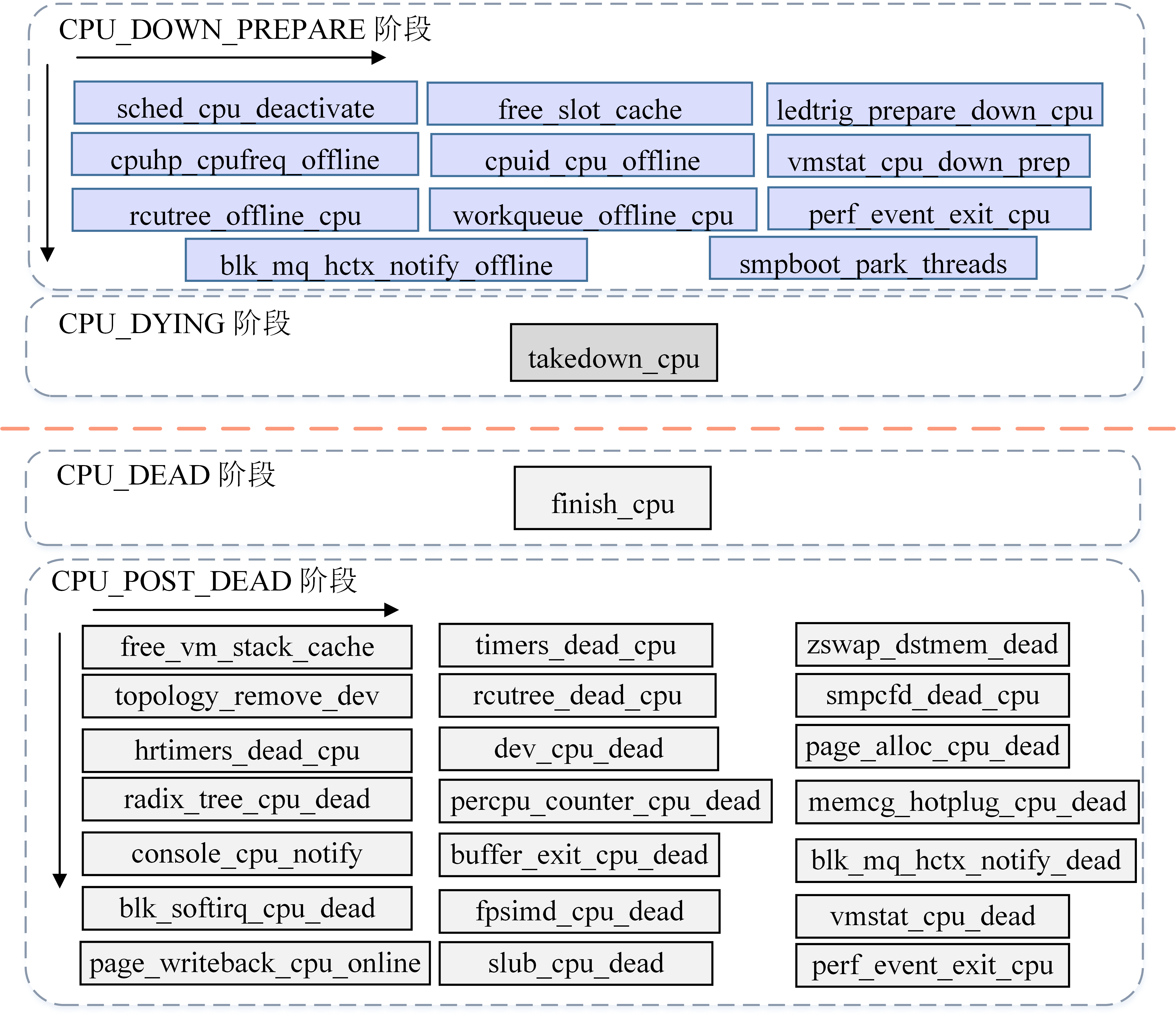
通过 /sys/devices/system/cpu/hotplug/states 来查看所有注册的回调函数
  0: offline
  1: threads:prepare
  7: x86/mce:dead
  8: virtio/net:dead
 10: slub:dead
 12: mm/writeback:dead
 13: mm/vmstat:dead
 14: softirq:dead
 20: block/softirq:dead
 21: block/bio:dead
 22: acpi/cpu-drv:dead
 24: block/mq:dead
 25: fs/buffer:dead
 26: printk:dead
 27: mm/memctrl:dead
 28: lib/percpu_cnt:dead
 29: lib/radix:dead
 30: mm/page_alloc:pcp
 31: net/dev:dead
 32: iommu/iova:dead
 35: random:prepare
 36: workqueue:prepare
 38: hrtimers:prepare
 40: smpcfd:prepare
 41: relay:prepare
 43: RCU/tree:prepare
 51: base/topology:prepare
 54: trace/RB:prepare
 58: timers:prepare
 59: tmigr:prepare
 61: kvmclock:setup_percpu
 62: fork:vm_stack_cache
 63: crash/cpuhp
 82: cpu:kick_ap
 83: cpu:bringup
 84: idle:dead
 85: ap:offline
 86: x86/cachectrl:starting
 87: sched:starting
 88: RCU/tree:dying
137: smpcfd:dying
138: hrtimers:dying
139: tick:dying
142: ap:online
143: cpu:teardown
146: kvm/cpu:online
147: sched:waitempty
148: smpboot/threads:online
149: irq/affinity:online
150: block/mq:online
154: perf:online
185: tmigr:online
186: lockup_detector:online
187: workqueue:online
188: random:online
189: RCU/tree:online
190: kthreads:online
191: base/cacheinfo:online
192: x86/kvm:online
193: mm/writeback:online
194: mm/vmstat:online
195: padata:online
196: io-wq/online
197: topology/cpu-capacity
198: umwait:online
199: lib/percpu_cnt:online
200: acpi/cpu-drv:online
201: x86/mce:online
202: printk:online
203: virtio/net:online
234: x86/kvm/clk:online
235: sched:active
236: online
2 core 的,hotplug 到 32 个 core ,online 仅仅 cpuhp/29 ,结果为:
  F S UID    PID  PPID  C PRI NI ADDR SZ WCHAN STIME TTY     TIME CMD
  1 S root    21     2  0  80  0 -     0 -     10:38 ?   00:00:00 [cpuhp/0]
  1 S root    22     2  0  80  0 -     0 -     10:38 ?   00:00:00 [cpuhp/1]
  1 S root  1015     2  0  80  0 -     0 -     10:39 ?   00:00:00 [cpuhp/29]
例如 [cpuhp/29] 负责 CPU 29 的部分 hotplug 状态转换回调。这些回调用来初始化或清理各内核子系统的 CPU 相关资源,在线阶段的回调在绑定到目标 CPU 的 hotplug 线程中执行。平时没有工作,线程就睡眠。内核 CPU hotplug 文档 (https://cdn.kernel.org/doc/html/latest/core-api/cpu_hotplug.html)
具体来说这个:
static struct smp_hotplug_thread cpuhp_threads = {
	.store			= &cpuhp_state.thread,
	.thread_should_run	= cpuhp_should_run,
	.thread_fn		= cpuhp_thread_fun,
	.thread_comm		= "cpuhp/%u",
	.selfparking		= true,
};
核心流程
offline
- entry_SYSCALL_64
  - do_syscall_64
    - do_syscall_x64
      - ksys_write
        - vfs_write
          - new_sync_write
            - call_write_iter
              - kernfs_fop_write_iter
                - online_store
                  - device_offline
                    - device_offline
                      - cpu_device_down
                        - cpu_down
                          - cpu_down_maps_locked
                            - _cpu_down
- _cpu_down
- cpuhp_kick_ap_work
- cpuhp_kick_ap
- 目标函数运行: cpuhp_thread_fun
- cpuhp_kick_ap
- cpuhp_down_callbacks
- cpuhp_invoke_callback_range
- cpuhp_kick_ap_work
online
echo 1 | sudo tee /sys/devices/system/cpu/cpu29/online
- entry_SYSCALL_64
- do_syscall_64
- do_syscall_x64
- ksys_write
- vfs_write
- new_sync_write
- kernfs_fop_write_iter
- online_store
- device_online
- cpu_subsys_online
- cpu_device_up
- cpu_up
- _cpu_up
- cpuhp_up_callbacks
- cpuhp_invoke_callback_range
- __cpuhp_invoke_callback_range
- cpuhp_invoke_callback
- native_kick_ap
- cpuhp_invoke_callback
- __cpuhp_invoke_callback_range
- cpuhp_invoke_callback_range
- cpuhp_up_callbacks
- _cpu_up
- cpu_up
- cpu_device_up
- cpu_subsys_online
- device_online
- online_store
- kernfs_fop_write_iter
- new_sync_write
- vfs_write
- ksys_write
- do_syscall_x64
- do_syscall_64
online 一个 CPU 具体的过程
核心逻辑在 kernel/cpu.c(CPU 热插拔代码)中
- AP 是 Application Processor
- BP 是 Bootstrap Processor
echo 1 > /sys/devices/system/cpu/cpu1/online
BP :准备资源,启动 CPU1
发起侧大致走:
online_store → device_online → cpu_subsys_online → cpu_up → _cpu_up → 准备各子系统的 per-CPU 资源 → native_kick_ap(cpu=1)
准备内容包括内存分配器、workqueue、定时器、RCU、拓扑和 kvmclock 等。
架构启动代码将 CPU1 引导到 start_secondary()。CPU1 从这里开始独立执行;。
1. CPU1:从 start_secondary() 到第一次通知
这一整条调用链运行在 CPU1 的 idle task 中。
- start_secondary
    - cr4_init
    - cpu_init_exception_handling
    - load_ucode_ap

    - cpuhp_ap_sync_alive : 初次等待
        - 设置共享状态 ALIVE
        - 等待 CPU0 将状态改成 SHOULD_ONLINE

    - cpu_init
    - fpu__init_cpu
    - rcutree_report_cpu_starting
    - x86_cpuinit.early_percpu_clock_init

    - ap_starting
        - apic_ap_setup
        - identify_secondary_cpu
        - set_cpu_sibling_map
        - ap_init_aperfmperf

        - notify_cpu_starting
            - rcutree_report_cpu_starting
            - cpuhp_invoke_callback_range_nofail
                - __cpuhp_invoke_callback_range
                    - cpuhp_invoke_callback
                        - 各 STARTING 阶段回调

    - check_tsc_sync_target
    - ap_calibrate_delay
        - calibrate_delay
    - speculative_store_bypass_ht_init

    - set_cpu_online(1, true)
    - lapic_online
    - x86_platform.nmi_init
    - local_irq_enable
    - x86_cpuinit.setup_percpu_clockev

    - cpu_startup_entry(CPUHP_AP_ONLINE_IDLE)
        - arch_cpu_idle_prepare

        - cpuhp_online_idle
            - cpuhp_ap_update_sync_state(SYNC_STATE_ONLINE)
            - stop_machine_unpark
            - 设置 st->state = CPUHP_AP_ONLINE_IDLE

            - complete_ap_thread(st, true)
                - complete(&st->done_up)             ← 第一次通知
                    - complete_with_flags
                        - swake_up_locked
                            - try_to_wake_up(bash)

        - while (1)
            - do_idle
                - 空闲等待,直到需要调度
                - schedule_idle
                    - 调度切换到可运行任务
源码主要在 arch/x86/kernel/smpboot.c、kernel/sched/idle.c 和 kernel/cpu.c。
第一次 complete() 就藏在 cpu_startup_entry → cpuhp_online_idle 下面。
2. CPU0:收到第一次通知后,启动 cpuhp/1
CPU0 上执行 echo 的任务,此时处在下面这条调用链中:
- cpuhp_bringup_ap(cpu=1)
    - cpuhp_bp_sync_alive
        - cpuhp_wait_for_sync_state : 处理初次等待
            - 等待 CPU1 的 ALIVE
            - 改成 SHOULD_ONLINE,放行 CPU1

    - bringup_wait_for_ap_online
        - wait_for_ap_thread(st, true)
            - wait_for_completion(&st->done_up)      ← 等第一次通知

        - kthread_unpark(st->thread)                 ← 解除 cpuhp/1 的 parked 状态

    - cpuhp_kick_ap
        - cpuhp_set_state
        - __cpuhp_kick_ap
            - 设置 st->should_run = true
            - wake_up_process(st->thread)            ← 唤醒 cpuhp/1
            - wait_for_ap_thread(st, true)
                - wait_for_completion(&st->done_up)  ← 等第二次通知
也就是说,CPU1 发出第一次通知后,CPU0 才把后面的 ONLINE 回调工作交给 cpuhp/1。
3. CPU1:切换到 cpuhp/1,执行第二次通知
这里有一个关键的任务切换边界:
CPU1 的 idle task:
    start_secondary
        - cpu_startup_entry
            - do_idle
                - schedule_idle

                    ↓ 调度切换,不是普通函数调用

CPU1 的 cpuhp/1 task:
    kthread
        - smpboot_thread_fn
            - cpuhp_thread_fun
所以不能把 cpuhp_thread_fun() 直接画成 start_secondary() 的普通子调用。它有自己的任务和内核栈。
cpuhp/1 的调用树如下:

- kthread
    - smpboot_thread_fn
        - cpuhp_thread_fun                         ← 反复调用,每次推进一个回调
            - cpuhp_next_state
            - cpuhp_invoke_callback
                - 当前状态对应的 ONLINE 回调
                  例如:
                    irq_affinity_online_cpu
                    perf_event_init_cpu
                    workqueue_online_cpu
                    rcutree_online_cpu
                    cacheinfo_cpu_online
                    acpi_soft_cpu_online
                    ...
                    sched_cpu_activate

            - 当所有回调完成,st->should_run 为 false
                - complete_ap_thread(st, true)
                    - complete(&st->done_up)        ← 第二次通知
                        - complete_with_flags
                            - swake_up_locked
                                - try_to_wake_up(bash)
上面的回调列表表示多次 cpuhp_thread_fun() 调用中依次执行的回调,不是一次调用里全部执行。
发现
CPU0 online 不可以写
原来 cpu0 作为 boot cup , 的 online 是不可以 echo 的 /sys/devices/system/cpu0/online
cpu 热插之后,cpu 立刻就可以看到,不需要手动 online
| echo 1 | sudo tee /sys/devices/system/cpu/cpu7/online |
#!/usr/bin/env bash

set -E -e -u -o pipefail
cd "$(dirname "$0")"

total_number=$(grep -c ^processor /proc/cpuinfo)
total_number=32
for ((i = 1; i < total_number; i = i + 1)); do
	echo 0 >/sys/devices/system/cpu/"cpu$i"/online
done
不过,大多数时候,这个工作被 udev 完成了
ARM CPU 热插拔暂不支持
从 Documentation/arch/arm64/cpu-hotplug.rst ARM 从内核的角度如何支持
CONFIG_MEMORY
CONFIG_MEMORY_HOTPLUG
CONFIG_MEMORY_HOTPLUG_DEFAULT_ONLINE
CONFIG_ACPI_HOTPLUG_MEMORY
的确是 CPU 热插的时候,会遇到问题的:
{
  "error": {
    "class": "GenericError",
    "desc": "machine does not support hot-plugging CPUs"
  }
}
https://www.youtube.com/watch?v=VdMkf06Pc6w&ab_channel=KVMForum
qemu CPU 限制警告
qemu-system-x86_64: warning: Number of hotpluggable cpus requested (128) exceeds the recommended cpus supported by KVM (32)
/* Find number of supported CPUs using the recommended
 * procedure from the kernel API documentation to cope with
 * older kernels that may be missing capabilities.
 */
static int kvm_recommended_vcpus(KVMState *s)
{
    int ret = kvm_vm_check_extension(s, KVM_CAP_NR_VCPUS);
    return (ret) ? ret : 4;
}
qemu 操作
-> { "execute": "device_add",
     "arguments": { "driver": "e1000", "id": "net1",
                    "bus": "pci.0",
                    "mac": "52:54:00:12:34:56" } }
<- { "return": {} }
qemu 常用命令 info hotpluggable-cpus
和嵌套虚拟化的关系
考虑下面两个场景:
- L0 hotplug 一个 cpu 到 L1 中
- L1 hotplug 一个 cpu 到 L2 中
所以说,这个是没有什么关系的。
unplug 一个 CPU,然后热迁移,QEMU 如何保证 CPU 的数量
应该是,和 hotplug memory 类似,这都是 libvirt 的工作
TODO
- 为什么有时候热插不上
[Tue Feb 18 22:48:02 2025] ACPI: Unable to map lapic to logical cpu number - 发现 htop 的一个 bug
🧀 ls /sys/devices/system/cpu cpu0 cpufreq enabled kernel_max online present umwait_control cpu1 cpuidle hotplug modalias possible smt vulnerabilities cpu48 crash_hotplug isolated offline power uevent这个时候,htop 会把前面的 cpu1 到 cpu48 都显示出来
- maxcpus 会影响 guest os 的识别的,这个到底是如何实现的?
RCU ,或者 percpu 之类似乎都是可以看到的 maxcpus 的
本站所有文章转发 CSDN 将按侵权追究法律责任,其它情况随意。